


Many people want to use TikTok but don’t want to install the app. This can happen when your phone has low storage, the app is restricted, or you simply prefer using a browser. TikTok works on desktop and mobile browsers, and you can watch videos, explore hashtags, and view profiles without downloading anything. This guide shows simple ways to browse TikTok without the app, using clear steps anyone can follow.
Reasons People Browse TikTok Without the App
Here are some common reasons users avoid installing the TikTok app:
- Not enough storage on iPhone or Android
- Want to watch TikTok without logging in
- Privacy or data concerns
- App restrictions on work or school devices
- Using a shared device
- Browsing TikTok faster on desktop
- Account banned or app not available in the region
- Only need TikTok to watch content, not create videos
How to Browse TikTok Without the App
If you don’t want the TikTok app, follow these simple ways to watch videos and explore content through a browser.
1. Use the Official TikTok Website (Desktop or Mobile Browser)
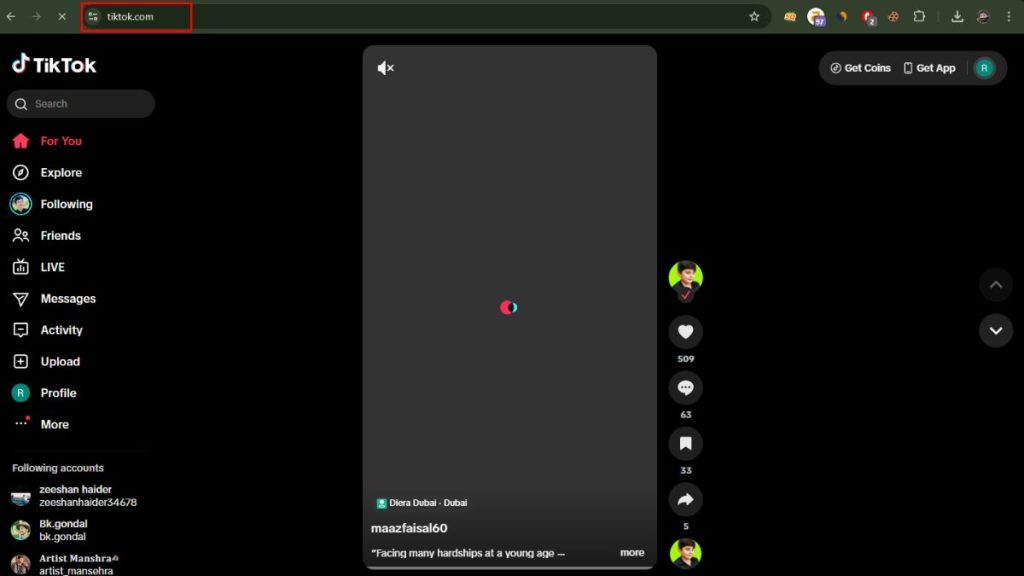
TikTok has a full website that works on Windows, Mac, iPhone, and Android. You can open TikTok.com in a browser and start watching videos right away. The website lets you scroll through trending content, search videos, view hashtags and check profiles.
To use TikTok Web:
- Open Chrome, Safari, Firefox or Edge
- Type TikTok.com
- Start scrolling through the main feed
- Use the search bar to find videos, sounds or accounts
- Click a hashtag to explore related content
TikTok Web works smoothly on most modern browsers and gives you access to public content without needing the app.
2. Browse TikTok Without Logging In
TikTok allows you to watch many videos without making an account. This is useful for users who want privacy or want to avoid sign-in prompts.
You can do things like:
- Search videos using the search bar
- Watch trending videos
- Explore hashtags
- View public profiles
- Watch videos shared through links
Some features require login, such as commenting, liking, following or uploading videos. But basic browsing works without signing in.
3. Use Mobile Browsers on iPhone or Android
If you don’t want the app on your phone, you can open TikTok.com in mobile browsers like Chrome, Safari or Firefox. Most videos load just like the app and you can scroll through content easily.
To improve the layout, you can turn on Desktop Mode:
- Safari: Tap the AA icon in the address bar and choose “Request Desktop Website”
- Chrome: Tap the three dots and choose “Desktop Site”
Desktop mode gives you a wider layout and more control while browsing.
4. Use Third-Party TikTok Viewers
Some websites let you view TikTok content without login or app installation. These online TikTok viewers allow you to open profiles, check hashtags and watch videos in a simple interface through your browser.
These tools help when:
- TikTok Web is blocked
- You want to browse without login prompts
- You want to view only specific profiles or tags
Search for “TikTok online viewer” to find these tools. Avoid entering your login details on third-party sites.
5. Browse TikTok Anonymously Using Private Browser Mode
Private browsing hides your session and stops TikTok from storing cookies or tracking your logged-in state. This helps you watch content without creating an account or saving your activity.
Ways to open a private session:
- Chrome: New Incognito Window
- Safari: Private Browsing
- Firefox: New Private Window
- Edge: InPrivate Window
Private mode helps you browse TikTok quietly without leaving a trail.
6. Use a VPN for Regional Restrictions
In some places, TikTok videos are restricted or the website loads with limited content. A VPN helps you access TikTok Web from another region by changing your location.
A VPN is helpful when:
- TikTok is blocked on your network
- You want to view videos only available in certain countries
- You travel and need access to home-region content
Turn the VPN on, reload the TikTok website, and the content should appear normally.
7. Limitations of Browsing TikTok Without the App
Browsing TikTok without the app works well, but some features are limited.
Features you cannot use:
- Posting videos
- Video editing tools
- Filters and effects
- Direct messages
- Full personalized For You Page
- Following creators without logging in
- Saving drafts
- Uploading audio or sounds
You can still enjoy watching and searching TikTok content, but you won’t get full creator features.
Tips for Better TikTok Browsing in a Browser
Here are simple tips that make browsing TikTok smoother:
- Use desktop mode on mobile for better layout
- Keep your browser updated
- Clear cache if TikTok Web loads slowly
- Disable heavy extensions that block video playback
- Use Wi-Fi for faster speeds
- Use landscape mode on mobile for big-screen viewing
Conclusion
You don’t need the TikTok app to watch videos. The TikTok website works on computers and phones, letting you browse, search and explore content easily. You can also use private browsing, third-party viewers or a VPN if TikTok Web is restricted. These simple methods give you full access to TikTok content without installing anything. If this guide helped you, feel free to share it or leave your thoughts.